
 Song-saem: From Planner to Developer with AIBlog home →
How Much Did AI Change in One Year? What the Benchmarks Show and What You Can Hand Over Now
Over the past year, AI went beyond writing answers and started carrying work forward with tools. This post covers the change in coding and computer-use scores, how AI coding tools now create and run files themselves, how to hand database work to AI through MCP, and how to decide how much to hand over.

How much did AI change in one year? The biggest change is that AI no longer stops at writing answers; it uses tools to carry the work forward. Public evaluations show big gains in fixing code and operating a computer screen. So AI coding tools now create and run files themselves, and can look up data or change structures in a connected database. But because AI now does the work directly, deciding how much to hand over matters more.
What changed, by the scores?
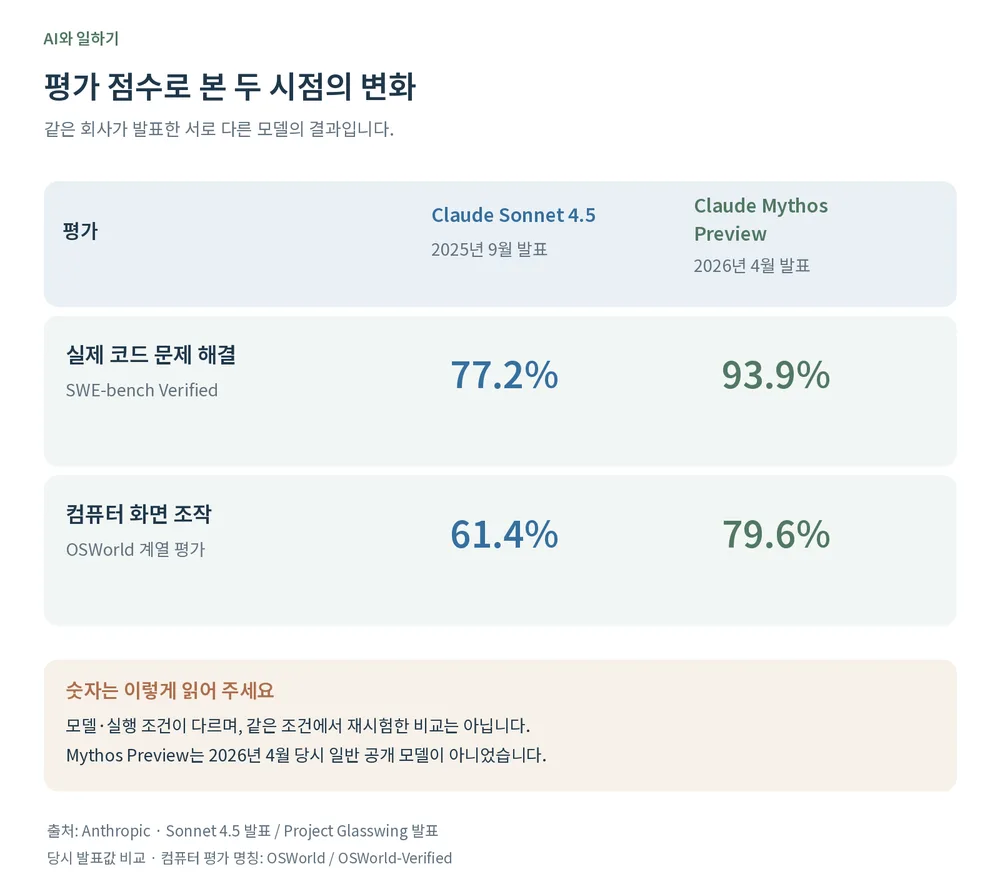
Two evaluations are closest to this story: fixing real code issues (SWE-bench Verified) and finishing tasks by seeing a computer screen and operating programs (OSWorld). Here are Anthropic’s reported results for two models.
| Evaluation | Claude Sonnet 4.5 (announced Sep 2025) | Claude Mythos Preview (announced Apr 2026) |
|---|---|---|
| Fixing real code issues (SWE-bench Verified) | 77.2% | 93.9% |
| Working through a computer screen (OSWorld) | 61.4% | 79.6% (OSWorld-Verified) |
Things to keep in mind when reading this table:
- The models and run conditions differ, and these are the company’s own evaluations, so it isn’t a strict same-condition comparison.
- Mythos Preview wasn’t a generally available model when announced.
- It doesn’t mean every free or paid AI you use scores like this.
Still, it shows the direction: the ability to carry out several steps in a row, as in fixing code and working on a computer, is improving.
The AI evaluator METR measures the same direction. It looks at how long tasks take people, and whether AI can solve tasks of that length at a set success rate. Here “a task of several hours” is a difficulty measured in human time, not AI working alone for that long. The evaluation also focuses mainly on software tasks. Read the scores less as proof that AI is good at everything and more as a sign of which abilities are growing.
1. What does it mean that AI creates files itself?
It used to be that AI gave you code and you moved it. You made folders and files, pasted it in, and copied error messages back to ask again. Now AI coding tools like Claude Code read the project and edit files directly. The official docs say it “reads your codebase, edits files, runs commands.”
| Task | The old way | The way now |
|---|---|---|
| Make new files | Copy code, make folders and files yourself and paste | AI creates the folders and files it needs |
| Fix an error | Copy the error message into the chat | AI runs commands, reads the result, finds the cause and fixes it again |
| Find what to change | Hunt through more and more files yourself | AI reads the project and finds the related files |
| Keep a record | Note what you changed separately | Ask, and AI records the change in Git |
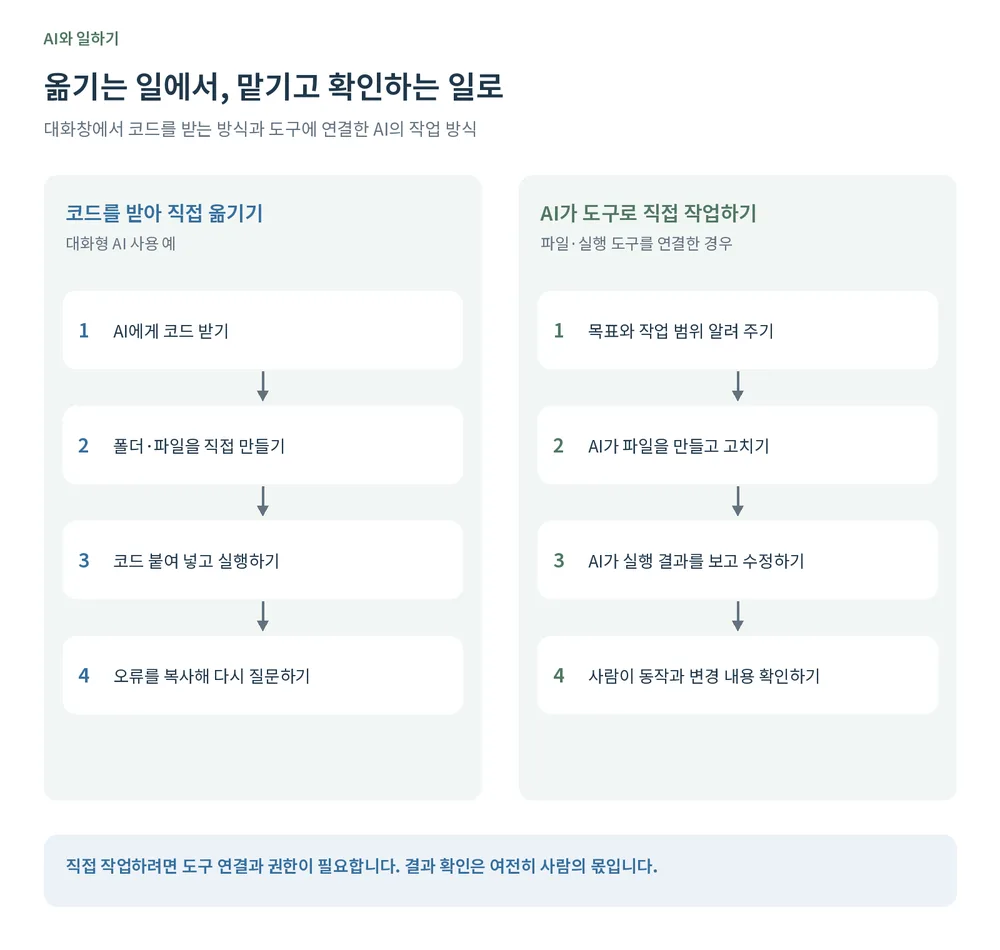
Not every AI can change your files. Asking in a chat window alone can’t touch the files on your computer. You need to connect an environment with access to your files and tools, and grant permission to work. In other words, the core of this change is a better model connected to working tools. AI that carries out several steps on its own like this is often called an “agent.”
The person’s job moves from moving code to explaining what to build and checking the result. You need to move fewer lines yourself, but checking structure and behavior is still yours.
2. How do you hand over database work?
A database is the store a program uses to save schedules or find customer records. Before, you copied the SQL AI wrote (the language for looking up or changing data) into an admin screen and ran it.
Now you can connect AI tools to outside services through MCP (Model Context Protocol). The official MCP docs call it “an open-source standard for connecting AI applications to external systems” and compare it to “a USB-C port for AI applications.” Connect Supabase, for example, grant the permissions needed, and you can hand over work like this.
| What to hand over | Example request |
|---|---|
| Check the structure | “Explain the tables related to schedules and what each column does.” |
| Count data | “Count how many schedules were added this month.” |
| Check settings | “See if there are any security warnings and explain why.” |
| Prepare a structure change | “Show me first what needs to change to store a place with each schedule.” |
Depending on permissions, it can run changes as well as lookups and checks. The step where a person copies SQL across shrinks. That doesn’t mean it manages the whole server on its own. It works only within the features the connected tool provides and the permissions you allow, and connecting through MCP doesn’t automatically guarantee accuracy or safety.
3. How much do you hand to AI that works directly?
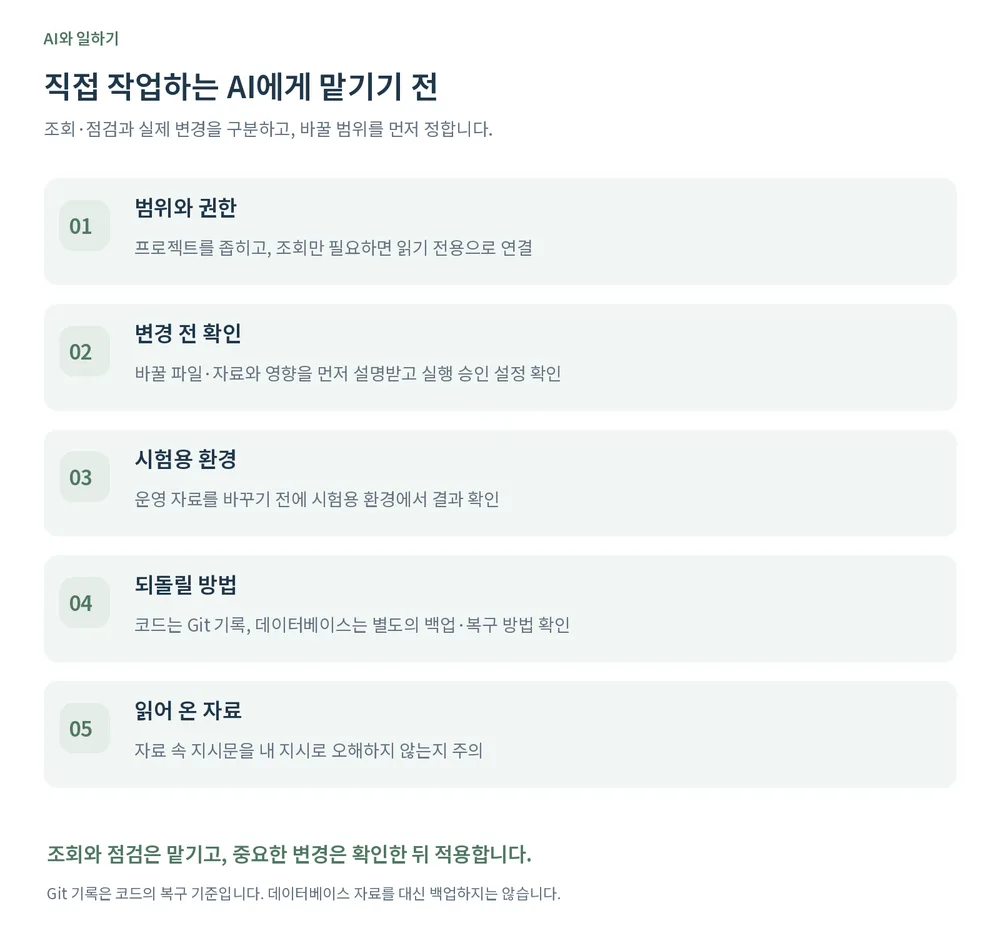
If AI only gives a wrong answer, a person has a chance to stop before running it. But when it handles files and databases directly, a wrong judgment can turn straight into a real change. So decide the scope in advance.
| Rule | What to do | Basis |
|---|---|---|
| Separate looking from changing | Connect read-only when you only need to check status | Supabase MCP docs: read-only for monitoring and diagnostics |
| Test, then apply | Check results in a test environment before production, and scope to the project you need | Supabase MCP docs: connect production only when needed, scope to one project, use a development branch |
| Explain changes first | “Don’t apply yet; tell me the files and impact first,” and check the approval settings | Claude Code security docs: reviewing proposed code and commands before approval is the user’s responsibility |
| Prepare a way back | Record code in Git; confirm backups and recovery before database changes | A Git record alone doesn’t restore database data |
| Watch for hidden instructions | Check AI doesn’t follow sentences in fetched pages or data as if they were your instructions | Supabase MCP docs: prompt injection named as a main risk |
My rule is short: hand over looking and checking; apply important changes after reviewing them. And I don’t leave permissions wide open just because AI said “I’ll be careful” in the chat.
What changes about the person’s job?
Moving code and repeating commands has shrunk. Deciding what to build, splitting how much to hand over and checking that the result fits the purpose matter more. For your own scheduler, don’t stop at “the schedule was added”; check it stays after a refresh and shows on other screens. For a business program, also check it fits the real work order. As AI’s ability to carry work forward grows, make requests specific: what to do, how far to change, and how to check.
In short
- Over the past year AI moved beyond writing answers to carrying work forward with tools.
- Coding and computer-use scores rose sharply, but they’re company-reported under different conditions, so read them as direction.
- AI coding tools create and run files themselves, and connected through MCP they can look up and change a database. An environment and permissions are needed.
- Separate looking from changing, test before applying, have changes explained first, prepare a way back and watch for hidden instructions.
At ONE-PEX, we work on the business system FROX by the same rules. AI helps with the code and database work, and people check that it fits the real work and what gets applied to production.
Sources (checked 2026-10-18)
- Anthropic, Introducing Claude Sonnet 4.5
- Anthropic, Project Glasswing (Claude Mythos Preview evaluations)
- METR, Time Horizons
- Claude Code docs, Overview
- Claude Code docs, Security
- Model Context Protocol, What is MCP?
- Supabase docs, Supabase MCP Server
Related reading: Why is AI confidently wrong? · How to ask AI well

A software planner who became a developer after two years of working with AI five to twelve hours a day. Today I build FROX, an AI-powered business system, at ONE-PEX.
More posts
- What Can You Build with AI?Orders in KakaoTalk, Stock in Excel, Receivables in a Notebook: Changing Messenger Orders Only the Owner Understands (Food Supplier, Part 1)
- What Can You Build with AI?I Fixed My TWA App, So Why Didn't It Change? What I Learned from the War with Caching
- What Can You Build with AI?Details Matter: Splitting 3D Characters and Vehicles So They Can Move (Building Road Voca 2, Part 5)