
 Song-saem: From Planner to Developer with AIBlog home →
The Tools You Need to Build a Web App: Node.js, React, Next.js, Supabase, Vercel, GitHub (Build Your Own Scheduler, Part 2)
Six tools you often hear about when building a web app, explained through a small restaurant: what each is, what it does in our scheduler, what to prepare before the next part, and how to let AI guide you through setup step by step.

What tools do you need to build a web app? This scheduler uses six. Node.js is the runtime that runs development on your computer, React and Next.js are code tools for building screens and server code, and Supabase, GitHub and Vercel are online services for storing, keeping and publishing. For personal use, all of them can start free. This is part 2 of the "Build Your Own Scheduler" series.
Think of one restaurant
| Tool | In a restaurant | In our scheduler |
|---|---|---|
| Node.js | The kitchen’s fire and power | Runs dev tools and the server on your computer |
| React | Dishes and utensils you reuse | Builds screen parts like task cards, inputs and buttons |
| Next.js | The floor plan and how it runs | Organizes pages, screens and server code in one project |
| Supabase | The storeroom and ledger | Saves tasks and handles login |
| GitHub | The recipe archive | Keeps code and its change history |
| Vercel | The space where the shop opens | Publishes the web app at a web address |
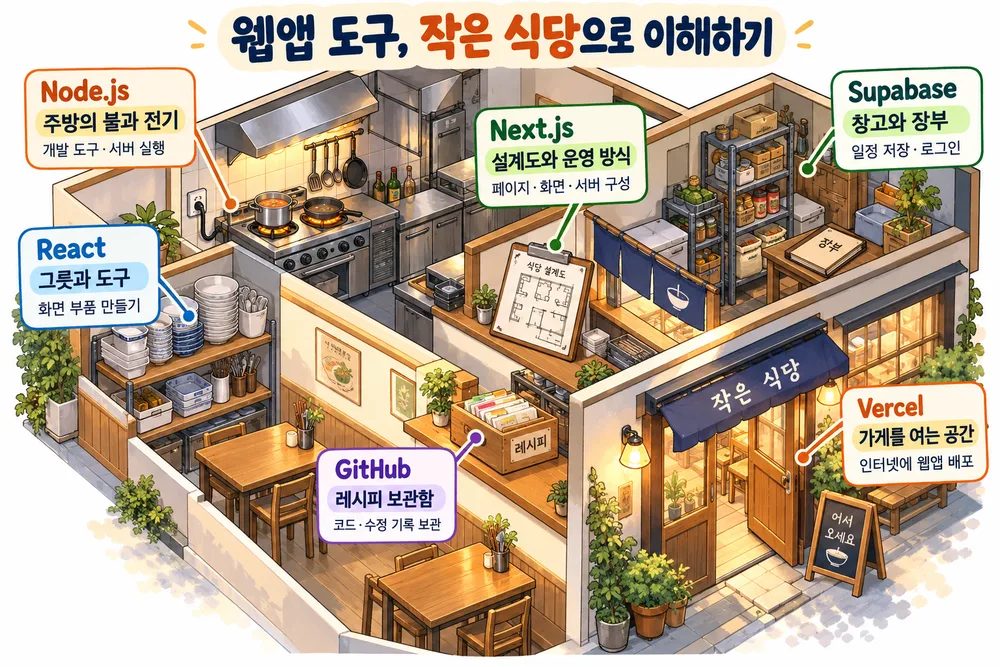
The key point: these six are not the same kind of thing. Node.js is a runtime, React and Next.js are code tools used in development, and the other three are online services.
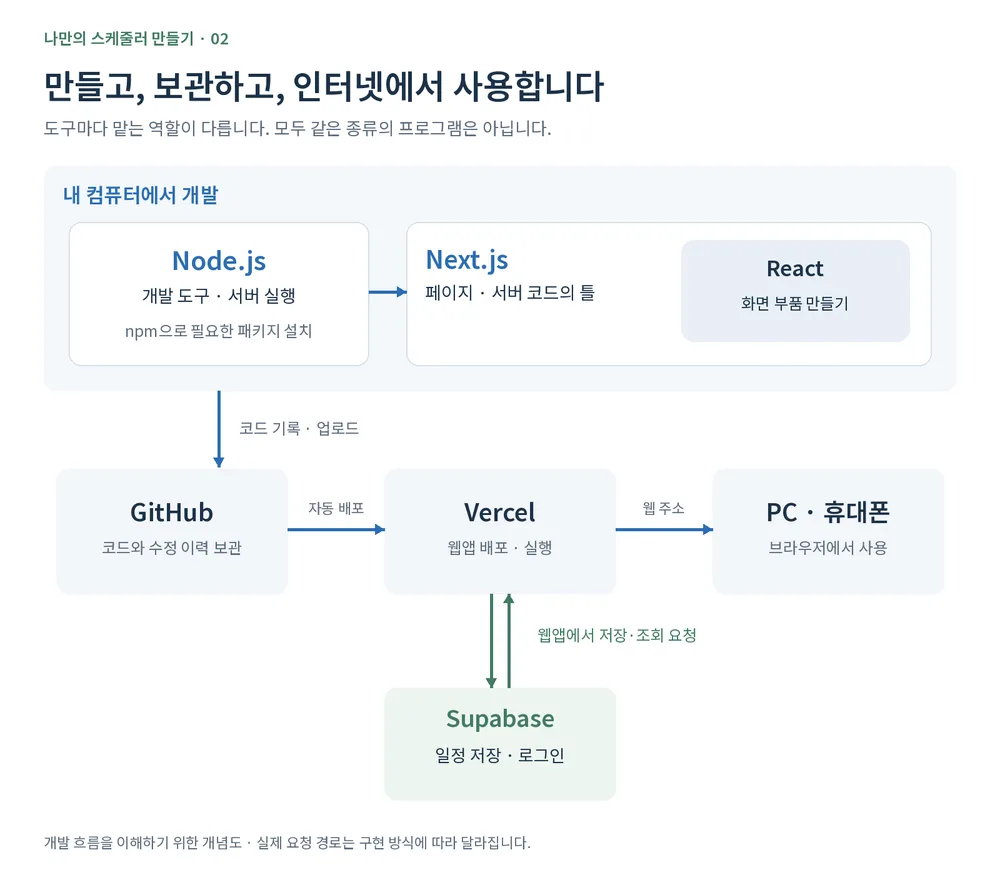
Node.js: the engine on your computer
Part 1 said JavaScript runs in the browser. Node.js lets JavaScript run outside the browser too. Here we use it to start the dev server and run tools on your computer. Installing with the official installer also installs npm, which downloads the code packages you need.
Choose the version marked LTS (long-term support) on the official site. The latest LTS is currently the 24 line, but if you read this later, go by whatever is marked LTS when you install.
React and Next.js: screen parts and their frame
React builds screens from parts. Make one "task card" and you can reuse it for ten tasks or a hundred. React also helps reflect changes on screen, such as when you tap done.
Next.js is a framework for building real web apps on top of React. Along with screens, it organizes page addresses and server-side features. For example, today’s tasks go at "/today" and this week’s at "/week": you create a page file in the matching folder to connect the screen.
Part 1’s "screen and server code in the same TypeScript" happens through Next.js in this series. You don’t sign up anywhere for React or Next.js; you install their packages when you create the project.
Supabase: the storeroom for your schedule
If tasks live only on screen without being saved, they can vanish on refresh. You could store them in the browser, but this time we use an online database so the same tasks show on both PC and phone.
Supabase provides a database, login and more. The SQL from part 1 is used to define the data structure and query it; in the app code, Supabase’s tools send save and fetch requests. Making sure only you see your tasks takes data access permissions as well as login, which part 5 covers.
The free plan includes a 500 MB database per project and two active projects, enough to start a small personal scheduler. Projects may be paused after 7 days without use; you can restart them from the dashboard, so watch for the notice email.
GitHub and Vercel: keep it, then put it online
GitHub keeps your code and records its changes. If AI edits code the wrong way, you can roll back to an earlier state, provided you recorded it. I rely on this history often. Not every change on your computer is recorded automatically, though: you record your work with Git and push it to GitHub, which we’ll practice as we go.
Vercel deploys your project so it can be used at a web address. Connected to GitHub, it can deploy automatically whenever you push changes. The Hobby plan for personal, non-commercial use is free. In part 6, we add this web address to your phone’s home screen.
Before the next part: prepare with AI
New to installing and signing up? That’s fine. Paste the following into ChatGPT, Claude or Gemini, switching Windows or Mac to match your computer.
"I’m a beginner using a Windows computer. I want to build my own scheduler web app. Help me install Node.js LTS and VS Code, and sign up for GitHub, Supabase and Vercel. Don’t explain everything at once; guide me one step at a time. Tell me the official site and which button to press, and move on when I say I’m done."
- Install Node.js and VS Code. Follow the AI’s guidance to download and run the installers from the official sites. If you’re unsure which file to pick, share a screenshot of the download page and ask which one fits your computer. Afterward, ask it to show you how to open a terminal, check the Node.js and npm versions, and launch VS Code. A terminal is a window for typing commands.
- Sign up for GitHub first. Create a GitHub account, then use it to sign up for Supabase and Vercel. Saying up front "I’ll only create accounts for now, no projects or paid plans" keeps the guidance clean. If the screen differs from the instructions, don’t guess; show the current screen. Type passwords and verification codes yourself; never send them to the AI.
- Set up an AI coding tool. I use Claude Code, but you can choose another. Installation differs by tool, so name the one you’ll use and ask it to confirm, from official guidance, whether your current plan includes it.
You don’t need to prepare React or Next.js now; they are installed when we create the project.
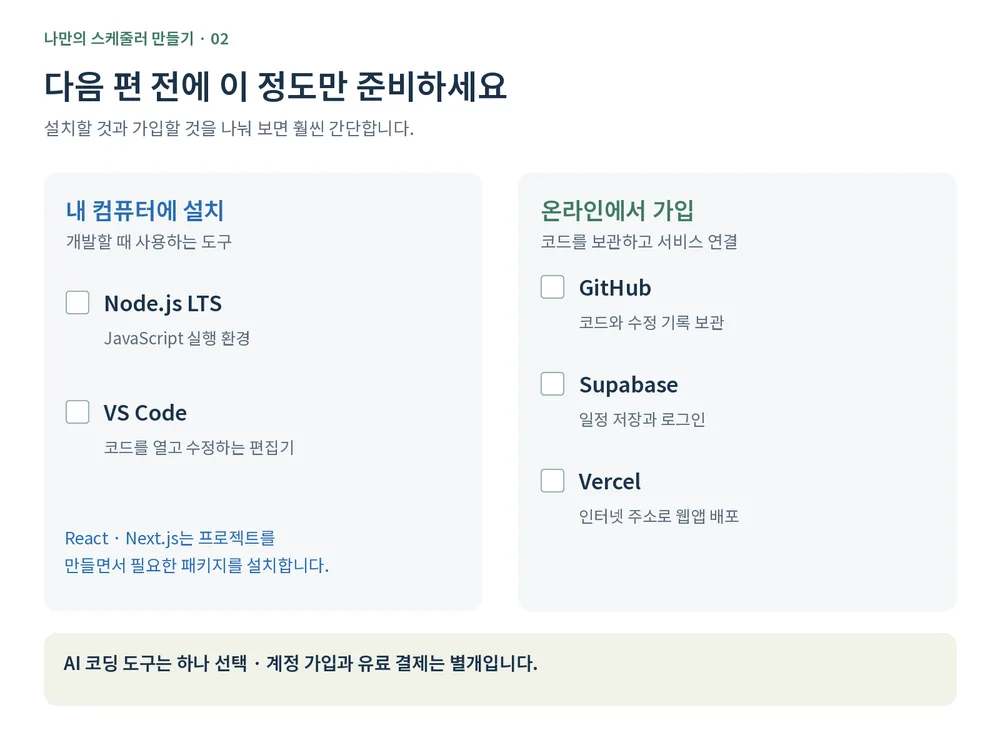
There’s no need to memorize every install step. Let the AI guide you one step at a time while you check your screen and results. For today, it’s enough that Node.js and VS Code run and you can log in to the three services.
In short
- The six are different kinds: Node.js is a runtime, React and Next.js are code tools, and Supabase, GitHub and Vercel are online services.
- React and Next.js need no sign-up; they are installed as packages when you create the project.
- Let AI guide your setup step by step, but type passwords and verification codes yourself.
FROX, the business system we build at ONE-PEX, is also built and run with Next.js, Supabase, Vercel and GitHub. The tools in this series are the same ones used in a real business system.
Next (Part 3): Before building screens, we plan what our scheduler needs and write a brief for the AI.
Related reading: Build Your Own Scheduler, Part 1: Which language should you build a web app in?
Sources

A software planner who became a developer after two years of working with AI five to twelve hours a day. Today I build FROX, an AI-powered business system, at ONE-PEX.